
Corporate team building
Team building with a survey game
Questions about the team, the company and everyday work — without putting people on the spot. This is FamiliVersus, an independent Family Feud–style game: two teams and a board on the projector. How to put that board on a screen: big-screen quiz.
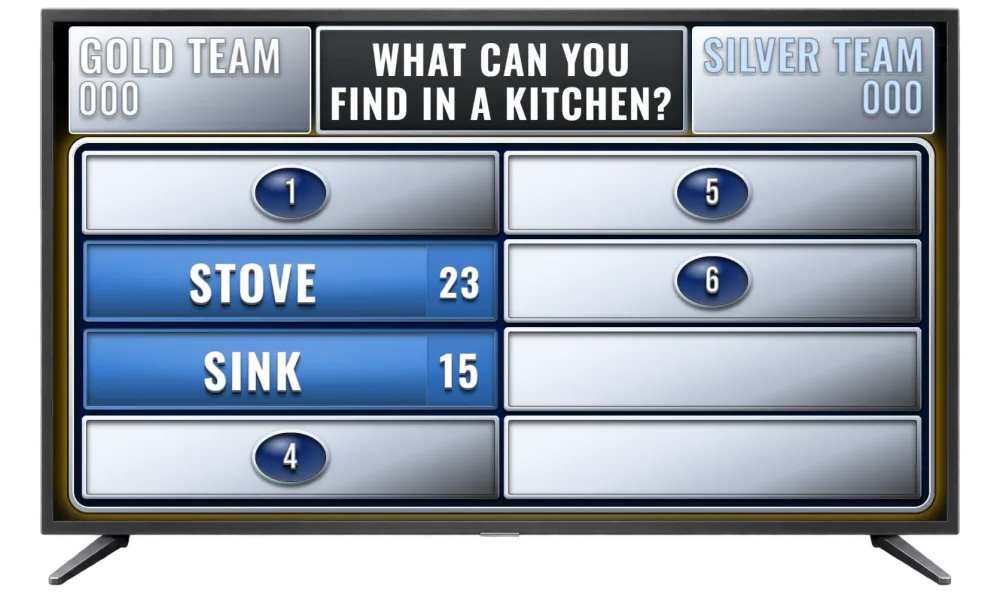
Classic corporate game show
The most universal format for a company event — two teams, a host, a screen with the answer board and questions tailored to your company.
Questions can cover daily habits, in-jokes, meetings, deadlines, clients, the office and situations most employees know well.
How it runs
- Participants split into two teams.
- The host reads a survey question.
- Team representatives hit their buzzers.
- The team that names the higher-scoring answer takes the round.
- Players try to reveal the remaining answers on the board.
- Each correct answer scores points for the team.
- After several rounds, the team with more points wins.
Questions work best when prepared from an anonymous employee survey beforehand — answers will really reflect your company, not random guesses.
Sample questions
- What do we drink at work?
- What is on an employee’s desk?
- What does an employee do when they get a message: “Got a minute?”?
- What do employees do right after returning from holiday?
- Who has worked at the company the longest?
- What does the company buy for everyone but only one person uses?
- What is the most common reason for being late to an online meeting?
- What is most often left after a company party?
- Which projects took the longest?
Task before the answer — corporate challenge
In this format every FamiliVersus round starts with a short team-building task. Teams need speed, cooperation and creativity — not just knowledge of the answers.
Winning the task does not score points. It gives the team first shot at the FamiliVersus question on the board.
How it runs
- The host splits participants into two teams.
- Before each round they announce a short task for both teams.
- Teams complete the task on time or race to finish first.
- The host judges the task and names the winning team.
- The winning team gets first answer on the FamiliVersus question.
- The host reveals the answer board and runs a standard round.
- Correct answers score points; wrong ones may let the other team steal.
- After the round, the next task and question follow.
- After the set number of rounds, the team with more points wins.
The task is an add-on — it does not replace the survey question and does not award points directly. It only decides which team answers first.
Sample tasks
- Build the tallest cup tower in 30 seconds.
- Put project stages in the right order.
- Line up by tenure — without speaking.
- Act out an industry slogan without words.
- Find three items in the room that match given criteria.
- Recreate a short pose or company gesture together.
- Move a ball or cup from A to B without using hands.
- Form the first letter of the company name with your bodies.
- In 20 seconds, invent a tagline for a fictional product.
- Match prepared roles to the right project stages.
Sample FamiliVersus questions
- What disappears most often from the office kitchen?
- What do employees do five minutes before an important presentation?
- What phrase comes up most often in meetings?
- What most often delays a project?
- What must happen before Monday can start at the company?
- What does the client most often change at the last minute?
The host judges tasks — the app cannot tell which team finished first. FamiliVersus handles questions, reveals and scoring; tasks happen in the room. Keep them short, safe and skill-light.
Company tournament — timed cup bracket
Several teams, a knockout bracket and matches played through to a grand final. In each match two team representatives answer the same questions, but points are tracked separately per team.
How it runs
- Participants split into four or eight teams.
- The host draws pairs and builds a tournament bracket.
- Each match pits two teams. Each picks a representative.
- The host launches a question with the answer board.
- Representatives hit buzzers. Whoever reacts first answers first.
- Each answer has a time limit — e.g. 10 seconds.
- A correct answer is revealed and points go to that team.
- A wrong answer or timeout is a strike; the other team may answer.
- Players alternate until the round ends.
- After the set number of rounds, the higher-scoring team advances.
- Semi-final winners meet in the grand final.
Teams can pick different representatives in later matches so more people take part. No audience hints during answers — speed, knowledge and time pressure count.
Sample questions
- What disappears most often from the office kitchen?
- What phrase comes up most often in a meeting?
- What do employees do five minutes before an important presentation?
- What most often delays a project?
- What must happen before Monday can start at the company?
- What does the client most often ask at the last minute?
FamiliVersus runs individual matches, shows answers and scores points. The host runs the bracket, pairs teams and announces who advances.
A round that does not point at anyone
Mix the teams: floor with floor, or project with project — not leadership versus everyone else. Ask about tools, the Monday status and the kitchen coffee. Skip looks, private life and any ranking of who is worst.
The points below are an illustration, not a survey of your company.
What do people least want in a Monday status meeting?
- Slides with no decision — 28 pts
- A meeting with no agenda — 22 pts
- Someone reading an email aloud — 18 pts
- Cameras forced on — 14 pts
- Running past the hour — 10 pts
- Another loop of “how was your weekend” — 8 pts
The host judges the answers. Room tasks, if you add them, do not score inside the app — they only decide who answers first.
Questions before the event
How do I avoid putting people on the spot at a team event?
Ask about the company, projects and team habits. Leave out looks, private life and rankings of who is worst. Mix the teams instead of leadership versus everyone else.
How many teams can play?
FamiliVersus supports two teams. The whole room can watch the TV board; teams buzz in on one device with two buttons.
Can I add my own questions?
Yes. On a free account you can prepare an unlimited library (categories, questions, up to 8 answers when saving) — including questions about a couple, a company or guests, by hand or with AI on Premium. In gameplay the first 3 questions from your library are available (alphabetical order); the rest locked; up to 8 answers on the board. Full library in gameplay — with Premium.
Do players need accounts or phones?
No. Only the organiser needs an account. Teams do not sign up — they join via a link or QR code, or answer out loud at the screen. Players do not need their own phones: head-to-head rounds use one buzzer device (tablet or phone) with two buttons.
Does it work on a projector?
Yes — a browser and full screen are enough. It works in conference rooms, schools and community centres.
Do I need to install anything?
No. You and your guests install nothing. A browser and internet are enough — host panel, TV board and team buzzer are web pages.